
If you want to keep track of your test reports, then continue reading to learn how to use the QC Status Overview macro.
Step 1: Create your test report
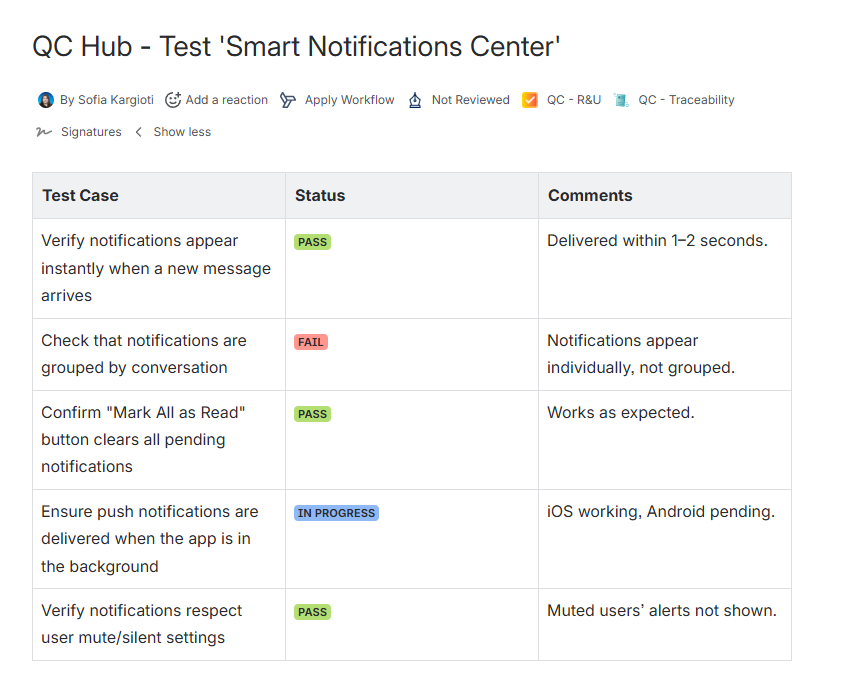
Create a Test page and insert a table. On this table, create your Test Report with cases based on your needs, and add the results of each test case.
Step 2: Get an overview of the test results
Once you are done with creating the Test pages, create a Test Report Overview page. Insert the QC Status Overview macro for each individual page.
Step 3: Repeat Step 2 for each test report
Repeat the second step of this guide for each individual test report to monitor the results.
Step 4: Get a combined overview of all the test reports
Use the QC Status Overview macro’s new functionality and select multiple pages to see in one place how many of your test cases were successful, how many need your attention, etc.