
QC Read & Understood for Confluence Cloud app helps companies keep track of users and the pages they reviewed.
Add the Read & Understood tool at the top of the page (byline) or add the Signature Box macro to help people you work with accept a page by clicking the “Read & Understood” button.
Usage
With the QC Read & Understood for Confluence Cloud app the user is able to review a page. By reviewing a page the user has the option to approve it, or revoke the approval. There are two ways to do so, either by using the QC R&U byline control button, or by using the Signature Box for QC R&U macro.
It is possible to assess all the reviews of a page by either clicking from the page menu QC – R&U Page Overview or by using the QC Read & Understood by page macro.
The app records the datetime and the version of the page that the user reviewed.
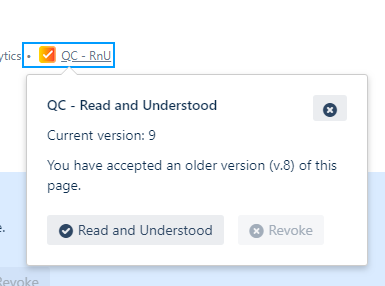
Confirmation of Understanding
Enable users to confirm that they have read and understood authorized pages using the QC R&U dialog for easy acknowledgment.

Page Tracking
Keep track of users’ confirmation status for pages and ensure compliance with internal policies and regulations.

User-Friendly Interface
Seamlessly integrate the confirmation process into the Confluence user interface with the Signature Box, making it simple and efficient for users to confirm their understanding.
For the QC Read & Understood documentation, please refer to this link.